TL;DR Alex Dubov and I just released the first public version of FMProxy, a security proxy for FileMaker Server. We are currently looking for beta testers. Want to try it out? Get your copy for Ubuntu Server x86_64 or arm_64. Make sure to read the trial docs (pdf).
Introduction and Research background
In the last few years, Alex Dubov and I have independently been researching the security of the FileMaker platform.
We both reported bugs directly to Claris and via the Apple Bug Bounty program.
While these reports led to fixes/improvements in the product, the full timeline – from discovery through reporting, validation, release, and eventual installation on customer servers – was often stretched over many months.
Early last year, during the discovery of more security-relevant issues, we teamed up to see if we can not only do the security research but also directly work on a solution ourselves.
The idea was to build a tool that would continuously analyze traffic to detect current threats, even before official patches for certain vulnerabilities were being provided. And on top of that, give administrators more visibility into connecting clients and their configurations/fingerprints.
At the Vienna Calling conference in June 2025 (yes, nearly a year ago – things take a while ;-)), we demonstrated a few newly discovered vulnerabilities in the latest version of FileMaker Server (denial of service, session hijacking and privilege escalation) and showed a preview of the proxy server we developed, which could detect – and in some cases prevent – exploitation of known and yet to be discovered vulnerabilities.
At the time, it was just a proof-of-concept on our local machines. We used the time since then to develop the proxy server to a point where it can now be easily installed and reliably run next to FileMaker Server on Ubuntu Linux.
To understand what the proxy inspects, it helps to first look at how clients talk to the server.
How do FileMaker clients communicate and what does the proxy look at?
FileMaker Pro and Go communicate with FileMaker Server using CORBA’s GIOP (General Inter-ORB Protocol), usually wrapped in TLS.
Let’s check briefly how the communication over this protocol works.
Looking at a traffic capture of FileMaker Pro/Go to FileMaker Server, we can see that GIOP packets contain a header specifying the message type (such as Request or Reply), and a body with several data fields in accordance with that type. These fields carry, for example, the request id, operation and of course the actual payload data.
The majority of packets you will see when observing FileMaker traffic are of the type Request and Reply, with the requests predominantly using the Perform operation.
A simple example:
A FileMaker Pro client wants to retrieve account information (or record data or any other data) for a certain database hosted on a FileMaker Server. To request this data, it sends a GIOP packet with the Request message type, Perform operation, and some payload in a proprietary format to the server.
This (unfortunately not publicly documented) payload contains, amongst other data, a session ID (also see Alex’s authentication bypass article), a command instructing the server to return specific data, and a location described as a hierarchical path to a data structure in the hosted database file (in this example a location where account information is stored). This path structure is the same as you would find in an fmp12 file (see my analysis of the format here).
Example:
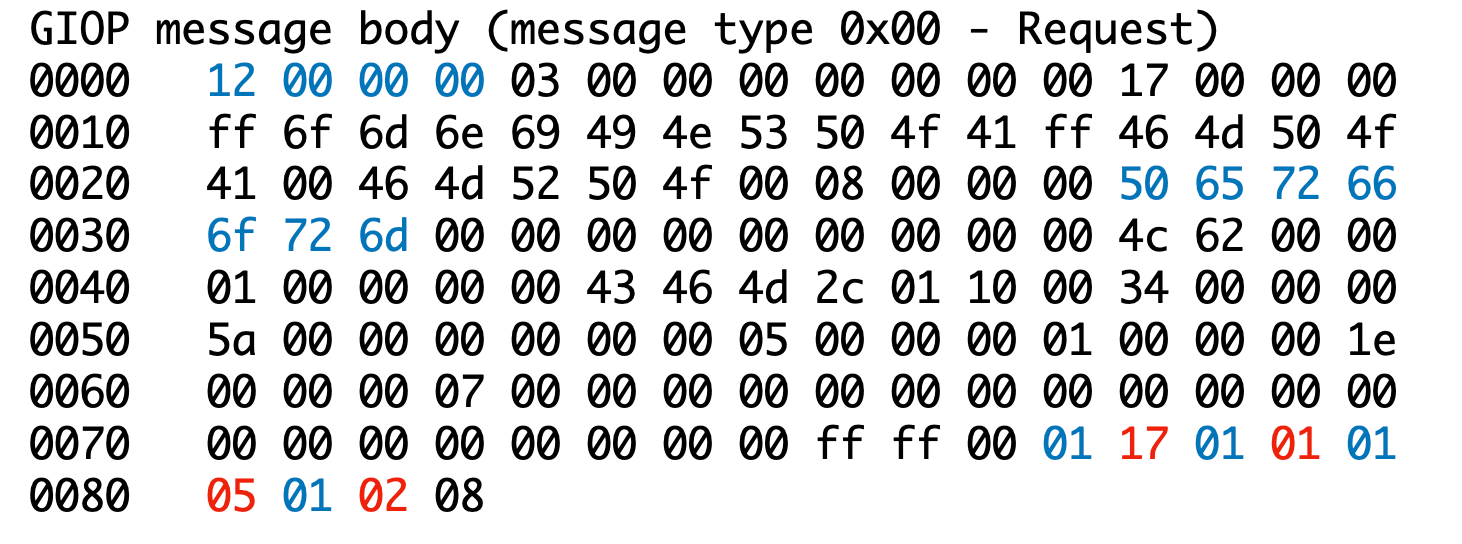
- 12 00 00 00 = Request ID 18
- 50 65 72 66 6f 72 6d = Perform (0x50 = ascii “P”, 0x65 = ascii “e”, …)
- Get data at path: 0x17, 0x01, 0x05, 0x02 (where 0x02 is the account ID)
The server will then answer (assuming the request was valid and the client authenticated) with a Reply packet containing the data at the requested path. In the case of a user account this data contains fields for name, privilege set, etc. and can be parsed as described in the fmp12 file format post linked above.
Example:
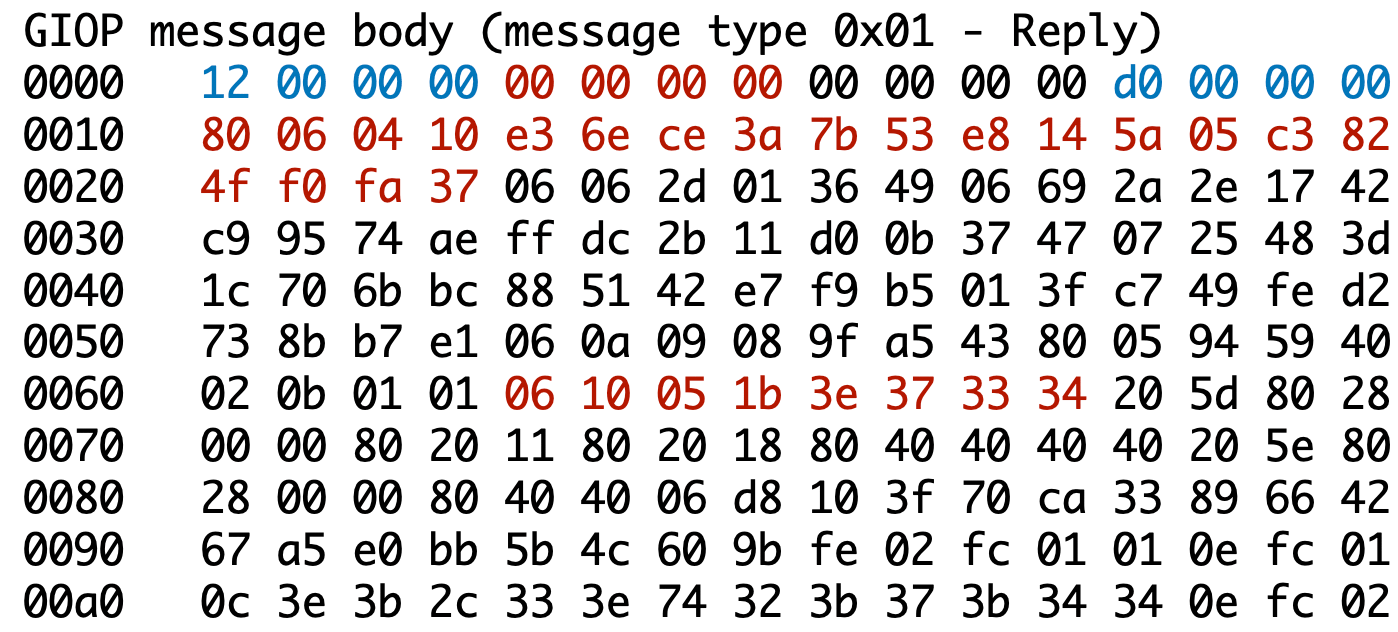
- 12 00 00 00 = Request ID 18 (matches this reply to the request)
- 00 00 00 00 = Status -> No Exception
- d0 00 00 00 = Length of message (208 bytes)
- 80 06 04 10 = NOP, 06 = code for key-value type, key 04, length 0x10 (16), some value
- 06 10 05 1b 3e 37 33 34 = type 06, key 0x10 (16), length 5, value = admin ^ 0x5a
What can we do with this knowledge and where does FMProxy fit in?
The idea behind FMProxy is that all this data flowing between server and clients is continuously analyzed to give you more information about who is connecting to your server with what kind of client setup (e.g. version, serial number, operating system), and to alert you if there are unusual/suspicious patterns appearing in the network traffic.
FMProxy runs on the same host as FileMaker Server and listens on the default port which FileMaker clients connect to (5003/tcp). To avoid conflicts, the FileMaker Server installation is modified to listen on another port.
Once a client connects to the proxy server, the proxy does two things:
- A quick scan of the packet contents to decide if there is any critical issue which should lead to a termination of the connection (a known DoS payload should never reach the FileMaker Server)
- If no severe issue is detected in the fast scan, we pass the packet contents to a separate task for deeper analysis while at the same time forwarding it to the target FileMaker Server.
Step 2 is implemented in this way such that it doesn’t couple the analysis overhead with the forwarding of the packet to FileMaker Server, to keep the latency penalty low.
Should the deeper analysis detect any issues (this is mostly unrelated to specific vulnerabilities, but rather a scan for unusual patterns such as a non-“Full Access” account accessing data it shouldn’t have access to), then these cases are logged to a file for further investigation by the server administrator. The logs would typically be forwarded to a central log server with alerting rules.
FMProxy generally tries to only do a minimum set of actions before forwarding data to FileMaker Server and the clients to not cause any interference with regular client-server communications (after all it’s a proprietary protocol and we want to keep traffic unchanged if at all possible). In very few cases we do have to rewrite parts of a packet to make the whole proxy setup feasible.
What can FMProxy actually detect?
Besides access logging, FMProxy currently has detection capabilities that log the following security events. The majority of them don’t focus on specific vulnerabilities, but rather on detecting patterns indicating authorization issues that could be a result of all kinds of vulnerabilities (known or not yet known).
| Event ID | Description |
|---|---|
| SEC-0001 | Detection of a request with an unknown session ID. Repeated events of this kind could be an indication of session ID brute-forcing. Session IDs are given out by the server when a client connects (before authentication). If a session ID for an already authenticated client is “guessed” by brute-force, it can allow an attacker to hijack that session and perform actions on behalf of the authenticated client. |
| SEC-0002 | Detection of a client downloading or attempting to download data from a database which is not part of the session used to initiate the download (i.e. no authentication was performed for this database during this session). |
| SEC-0003 | Detection of a client downloading or attempting to download a list of all scripts with an unauthenticated account. |
| SEC-0004 | Detection of a client downloading or attempting to download a list of all scripts with a non-“Full Access” account. This is benign if the authenticated account is not a Full Access account but has the permissions to modify scripts. |
| SEC-0005 | Detection of a client downloading or attempting to download data from a specific database without the corresponding account being authenticated. |
| SEC-0006 | Detection of a client accessing account information for an account other than self while the proxy has insufficient information about the privilege set / permissions of the authenticated account. With data going over the wire the proxy builds a representation of the privileges for different accounts. When a request is made to download data for another account, this representation is in most cases sufficient to judge if it’s a legit request or not. This event will be raised if the information is incomplete to judge the legitimacy of the request. |
| SEC-0007 | Detection of a client accessing account information for an account other than self while being authenticated but not having Full Access privileges. This message is benign if a non-Full Access account is configured with permissions to manage other accounts. |
| SEC-0008 | Detection of a client connecting with a persistent ID which is not present in the list of trusted clients. This event can only appear if the proxy was started with a list of trusted clients. |
| SEC-0009 | Detection of a client connecting with an invalid persistent ID. This could be an indicator of an attacker using a crafted payload using a custom tool. FileMaker clients will always connect with a valid ID. |
| SEC-0010 | Detection of a failed login. This event is always logged when a login fails (e.g. wrong account name / password combination). When automatic logins are configured, you might see this event appearing before a login prompt is shown to a user. |
| SEC-0011 | Detection of known payloads that will crash FileMaker server (denial of service) due to memory issues. |
| SEC-0012 | Detection of successful login. |
| SEC-0013 | Detection of non-FileMaker traffic on the listening port. This event will occur more frequently on public servers which experience probing traffic (bots trying to check for open ports and analyze what software is running). |
Want to get your hands on the first version?
If you would like to try out FMProxy in your own lab setup, you can get your copy for Ubuntu Server x86_64 or arm_64. If you would rather test on macOS or Windows, let us know – we have working versions but not a fully automated setup yet. For more information and installation and configuration instructions, please refer to the trial docs (pdf).
The current builds expire every 60 days, so if you would like to follow the progress, just send us an email and we keep you in the loop for new versions and later potential commercial options.
✉️ Have a comment? Please send me an email.